70-659 Certification Series – 1.1.4 Enable Hyper-V Role
Several Ways to Enable the Hyper-V Role…
Several Ways to Enable the Hyper-V Role…
1. Command Line:
- DISM /online /enable-feature /featurename:Microsoft-Hyper-V
- Startup ocsetup Microsoft-Hyper-V
1. PowerShell:
- Add-WindowsFeature Hyper-V
1. GUI: Server Manager – Add Role – Hyper-V
- May use remote management to install via GUI on Server Core
1. SCVMM – Add Host – Adding host will automatically add th Hyper-V Role
Command Line, Powershell or Remote Administration or SCVMM are required for Server Core
##
> _Video no longer available -- originally hosted on other. No archived copy could be recovered._
Silverlight is not installed or a later version is required.
Video Walks through the GUI
The Entire Series Can be Found at: [70-659 Microsoft Server Virtualization Certification Everything You Need To Know to PASS! Blog Post Series](http://itproguru-app.azurewebsites.net/expert/2012/01/70-659-microsoft-server-virtualization-certification-everything-you-need-to-know-to-pass-blog-post-series-2/)
[
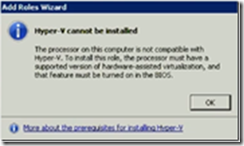
](/wp-content/uploads/2012/06/TurnOn_BIOS.png)Remember, before you can enable Hyper-V Role, you have to setup the BIOS 70-659 Certification Series – 1.1.3-Enable or Verify BIOS settings (i.e. DEP & VT) For Hyper-V