Adding or Manage Administrator users To Windows Azure Step-By-Step
Direct answer
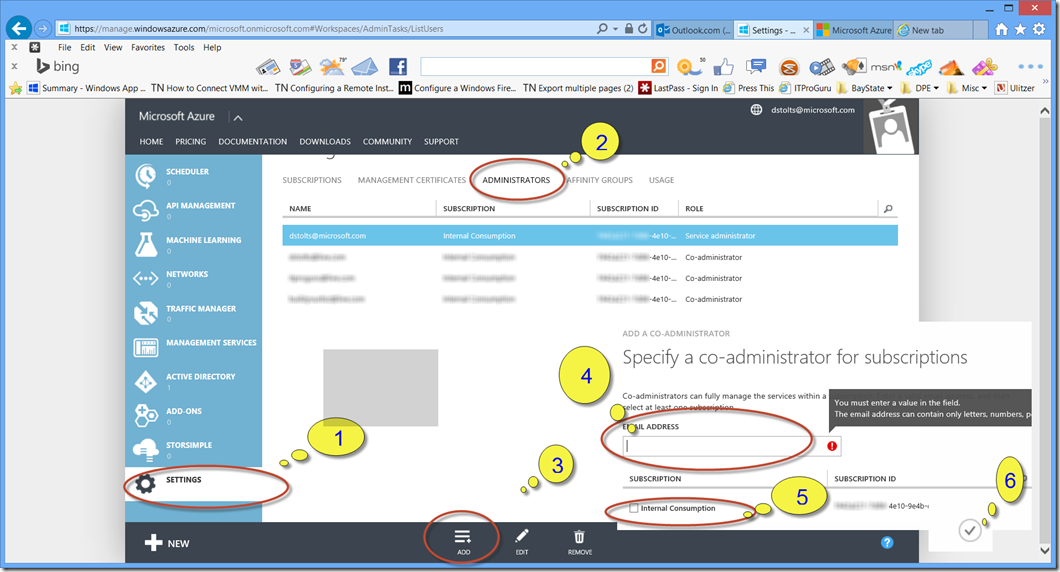
In the management portal scroll down in the Nav bar to Settings 1) Click Settings 2) click the Administrators Tab 3) Click Add 4) Enter the email address of the LiveID you would like to add as an administrator 5) Turn on the checkbox near the subscription Name 6) Then click the Check mark […]
In the management portal scroll down in the Nav bar to Settings
1) Click Settings
2) click the Administrators Tab
3) Click Add
4) Enter the email address of the LiveID you would like to add as an administrator
5) Turn on the checkbox near the subscription Name
6) Then click the Check mark in the lower Right corner
[
](/wp-content/uploads/2014/07/image.png)