How to Log Off, Shutdown, Sleep & Restart Windows Server 2012 and Windows 8
Direct answer
Log Off (Log Out) of Windows Server 2012 or Windows 8 Press Ctrl-Alt-Delete then select Sign Out Log Off of Terminal Session on Windows Server 2012 or Windows 8 If you are connected via RDP (Remote Desktop Client) Press Ctrl-Alt-End then select Sign Out You will notice on the screen you can also LOCK […]
Log Off (Log Out) of Windows Server 2012 or Windows 8
Press Ctrl-Alt-Delete then select Sign Out
Log Off of Terminal Session on Windows Server 2012 or Windows 8
If you are connected via RDP (Remote Desktop Client) Press Ctrl-Alt-End then select Sign Out
You will notice on the screen you can also LOCK the computer or bring up task manager
To Shutdown, Sleep, or restart
Press WindowKey + C {for the Charms menu} – Settings – Press the Power button on the popup menu and pick either sleep, restart or shutdown
[
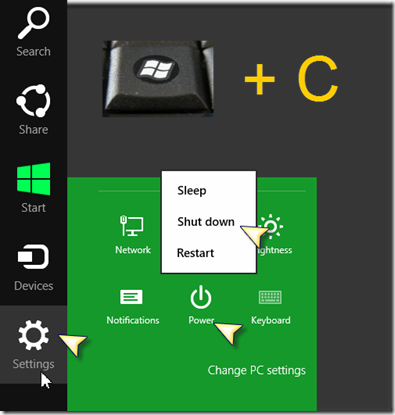
](/wp-content/uploads/2012/09/SNAGHTML22a4ed6.png)